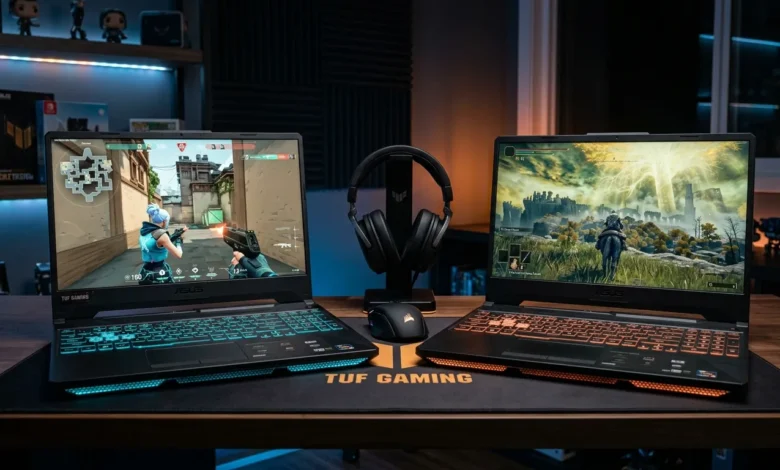
I’ve tested a lot of gaming laptops over the years, and most of them fall into two camps either they’re overpriced flagships with specs most people don’t need, or they’re budget machines that cut too many corners to be worth your money. The ASUS TUF Gaming F15 sits comfortably in neither. It’s a mid-range powerhouse that actually delivers where it counts, and after spending serious time with it, I have a lot to say.
But this review isn’t just about the F15. Since ASUS TUF Gaming A15 shares the same TUF DNA and constantly gets compared to the F15, I’m covering both specs, GPU variants, real-world performance, and which one actually makes sense to buy. Let’s get into it.
Table of Contents
What Is the ASUS TUF Gaming F15?
The ASUS TUF Gaming F15 is a 15.6-inch gaming laptop built around durability, performance, and value. It’s part of ASUS’s TUF lineup a series designed to offer serious gaming capability without the premium price tag of the ROG series.
What sets it apart is its MIL-SPEC durability rating, meaning it’s been tested against military-grade standards for drops, dust, temperature extremes, and humidity. For a gaming laptop in this price range, that’s genuinely impressive.
The F15 targets students, content creators, and everyday gamers who want a reliable machine they can carry around without babying it. I’ve taken mine to coffee shops, friends’ places, and on trips — and it’s held up without a scratch or complaint.
ASUS TUF Gaming A15 Laptop: The AMD Counterpart
Before diving deeper, let me clarify something that confuses a lot of buyers. The F15 runs Intel processors, while the ASUS TUF Gaming A15 laptop is the AMD version of essentially the same machine. Same chassis, same display options, same GPU configurations just different CPU architectures.
Both are excellent choices. The A15 tends to be slightly more affordable, while the F15 often edges ahead in single-core workloads. For gaming specifically, the difference is minimal in most titles.
ASUS TUF Gaming A15 Specs: What You’re Working With
Here’s a full breakdown of the ASUS TUF Gaming A15 specs across the main configurations available:
| Spec | Base Config | Mid Config | Top Config |
|---|---|---|---|
| CPU | Ryzen 7 7435HS | Ryzen 7 7735HS | Ryzen 7 7735HS |
| GPU | RTX 3050 | RTX 4050 | RTX 4060 |
| RAM | 8GB DDR5 | 16GB DDR5 | 16GB DDR5 |
| Storage | 512GB NVMe | 512GB NVMe | 1TB NVMe |
| Display | 15.6″ FHD 144Hz | 15.6″ FHD 144Hz | 15.6″ FHD 144Hz |
| Battery | 90Wh | 90Wh | 90Wh |
| Weight | 2.2 kg | 2.2 kg | 2.2 kg |
All configurations share the same military-grade build and MUX switch support which is a big deal at this price point.
ASUS TUF Gaming A15 Ryzen 7 7435HS: Entry-Level Done Right
The ASUS TUF Gaming A15 Ryzen 7 7435HS variant is the entry point of the lineup, and it’s more capable than its price suggests.
The Ryzen 7 7435HS is a solid mobile processor for gaming. It handles most esports titles without breaking a sweat Valorant, CS2 Apex Legends, and Fortnite all run beautifully. Where it starts to show its limits is in heavily CPU-dependent workloads like video rendering or simulation games with complex AI.
For everyday gaming and productivity, though, this chip is more than sufficient. I wouldn’t let the “entry-level” label put you off. Paired with the right GPU, this configuration punches above its weight class consistently.
ASUS TUF Gaming A15 RTX 3050: Budget Gaming That Still Works
The ASUS TUF Gaming A15 RTX 3050 configuration is aimed squarely at gamers on a tight budget. The RTX 3050 is a four-year-old GPU at this point, and it shows in demanding titles — but it still delivers a playable experience in the right games.
What it handles well:
- Valorant, CS2, Rocket League — 100+ FPS easily
- Minecraft, Stardew Valley, indie titles — zero issues
- Older AAA games at medium settings
Where it struggles:
- Modern AAA titles like Alan Wake 2 or Cyberpunk 2077 — expect sub-40 FPS at anything above low settings
- Ray tracing is essentially off the table
- DLSS helps, but only so much with 4GB VRAM
My honest take: the ASUS TUF Gaming A15 ryzen 7 rtx 3050 configuration is fine if your game library skews toward esports and indie titles. If you play modern open-world games regularly, stretch your budget to the RTX 4050 variant.
Also Read: Duo Gaming Guide to Setup, Gear, Laptops, and Everything In Between
ASUS TUF Gaming A15 RTX 4050: The Sweet Spot
This is the configuration I’d recommend to most people — the ASUS TUF Gaming A15 RTX 4050 paired with the Ryzen 7 7735HS.
The RTX 4050 is a meaningful generational jump over the 3050. DLSS 3 support, better ray tracing performance, and significantly more efficient power delivery all combine to make this a noticeably better gaming experience.
Real-world performance with RTX 4050:
- Cyberpunk 2077 — 60+ FPS at medium-high with DLSS Quality
- Elden Ring — locked 60 FPS at high settings
- Forza Horizon 5 — ultra settings, smooth 80+ FPS
- Call of Duty Warzone — high settings, 70–90 FPS
The ASUS TUF Gaming A15 (Ryzen 7 7735HS, RTX 4050) combination is genuinely one of the best value propositions in gaming laptops right now. You’re getting Ada Lovelace architecture, a strong AMD CPU, and that bulletproof TUF build all under $1,000 in most regions.
ASUS TUF Gaming A15 RTX 4060: When You Want More
Step up to the ASUS TUF Gaming A15 RTX 4060 and you’re entering a different performance tier entirely. The RTX 4060 brings 8GB GDDR6 VRAM, higher CUDA core count, and noticeably better 1080p performance across the board.
Why the RTX 4060 matters:
- Future-proofed for the next 2–3 years of gaming
- Handles 1440p gaming reasonably well
- DLSS 3 with Frame Generation support
- Better for content creation workloads alongside gaming
The trade-off is thermal performance. The RTX 4060 pushes the TUF A15’s cooling system harder, and you’ll notice the fans ramping up more aggressively during extended gaming sessions. It’s not a dealbreaker, but it’s worth knowing before you buy.
If you’re a heavy gamer who plays demanding titles daily, the RTX 4060 variant is worth the extra spend. For everyone else, the RTX 4050 hits the sweet spot.
ASUS TUF Gaming A15 FA506NFR: Model Number Explained
Buyers often get confused by ASUS’s model naming, so let me break down the ASUS TUF Gaming A15 FA506NFR designation:
- FA — TUF Gaming A-series
- 506 — 15.6-inch form factor
- N — AMD Ryzen processor generation
- F — RTX 4060 GPU
- R — specific regional/color variant
Understanding this helps you quickly identify what configuration you’re looking at when shopping across different retailers. The FA506NFR specifically refers to the RTX 4060 variant the top-end A15 configuration.
ASUS TUF Gaming A15 FA506NC-HN001W: Budget Entry Point
The ASUS TUF Gaming A15 FA506NC-HN001W is a specific SKU commonly found in Asian and European markets. The “NC” in the model name indicates the RTX 3050 GPU configuration, and HN001W is a regional variant identifier.
This model is typically the most affordable way into the TUF A15 ecosystem. It’s a legitimate gaming machine for casual players, but as I mentioned earlier, the RTX 3050 shows its age quickly in modern titles. Buy this if your budget is firm and your game list skews older or lighter.
ASUS TUF Gaming A15 Review: Build Quality and Daily Use
Let me give you my full ASUS TUF Gaming A15 review perspective on daily usability because specs on paper only tell half the story.
Build Quality The plastic chassis feels solid and purposeful, not cheap. The lid has minimal flex, the keyboard deck doesn’t bend under pressure, and the hinge mechanism feels like it’ll last years of daily opening and closing. The matte finish on the lid resists fingerprints reasonably well.
Keyboard and Trackpad The keyboard is one of the best in this price range. Key travel is satisfying, actuation feels precise, and the RGB backlighting is even across all keys. The trackpad is large enough for productive use, though serious gamers will obviously plug in a mouse.
Display The 144Hz FHD IPS panel is punchy and responsive. Colors are accurate enough for content consumption, and the 144Hz refresh rate makes gaming feel smooth and fluid. It’s not a color-accurate panel for professional photo editing, but for gaming and everyday use, it’s excellent.
Thermals This is where the TUF A15 earns its reputation. ASUS’s self-cleaning thermal system does a solid job of managing heat across all GPU variants. The RTX 4050 configuration stays cool and quiet during casual gaming — fans only ramp up noticeably during extended heavy sessions.
Battery Life Expect 4–6 hours of real-world use with gaming workloads. Light productivity stretches it closer to 6–7 hours. For a gaming laptop, that’s respectable the 90Wh battery is generous for this price point.
F15 vs A15: Which Should You Buy?
| Feature | TUF Gaming F15 | TUF Gaming A15 |
|---|---|---|
| CPU | Intel Core i7 | AMD Ryzen 7 |
| Single-Core Performance | Slightly Better | Good |
| Multi-Core Performance | Good | Slightly Better |
| Price | Slightly Higher | Slightly Lower |
| GPU Options | RTX 3050 to RTX 4070 | RTX 3050 to RTX 4060 |
| Best For | Mixed workloads | Pure gaming value |
For most gamers, the ASUS TUF Gaming A15 offers better value. The AMD Ryzen platform is efficient, capable, and well-matched to the GPU options available. The F15 makes more sense if you specifically need Intel’s single-core advantage for certain workloads or software.
Who Should Buy the ASUS TUF Gaming F15 or A15?
Buy it if:
- You want a durable, reliable gaming laptop under $1,000
- You play a mix of esports and mid-tier AAA games
- You need something that travels well and handles daily abuse
- You want solid thermals without paying ROG prices
Skip it if:
- You need a color-accurate display for professional work
- You want to game at 4K or high-refresh 1440p
- Ultra settings in every new AAA release is non-negotiable for you
Conclusion
The ASUS TUF Gaming F15 and its AMD sibling, the TUF Gaming A15, represent some of the best value in gaming laptops right now. Whether you go with the budget-friendly RTX 3050 entry point or stretch to the RTX 4060 top config, you’re getting a machine built to last, perform, and handle real gaming workloads without drama.
My personal recommendation: go for the ASUS TUF Gaming A15 with Ryzen 7 7735HS and RTX 4050. It’s the sweet spot of price, performance, and longevity that most gamers will genuinely appreciate for years to come.
For more in-depth laptop reviews and gaming gear guides, explore more at Sonosarc.
FAQs
Is the ASUS TUF Gaming F15 good for gaming in 2025?
Absolutely. The ASUS TUF Gaming F15 remains a strong mid-range gaming laptop in 2025, especially with RTX 4050 or RTX 4060 configurations. It handles most games at high settings with smooth frame rates and offers excellent build quality for the price.
What’s the difference between RTX 4050 and RTX 4060 in the TUF A15?
The RTX 4060 offers significantly better performance in demanding AAA titles and has 8GB VRAM versus 6GB in the 4050. For future-proofing and heavy gaming, the 4060 is the better pick. For budget-conscious buyers, the 4050 hits the sweet spot.
Is the ASUS TUF Gaming A15 Ryzen 7 7435HS good for gaming?
Yes. The Ryzen 7 7435HS handles gaming tasks efficiently and pairs well with entry-level GPU configurations. It’s not the fastest chip in the lineup, but it delivers consistent performance across most gaming scenarios.
How long does the TUF A15 battery last?
Expect 4–7 hours depending on usage. Gaming drains it faster, while productivity tasks extend battery life. The 90Wh battery is one of the largest in this price range.